Complete Visual Intelligence for Every Inspection
Conduct move-in, move-out, and renewal inspections with guided walkthroughs, AI-powered recommendations, health scores that track changes, and work order creation.
The complete record, room by room

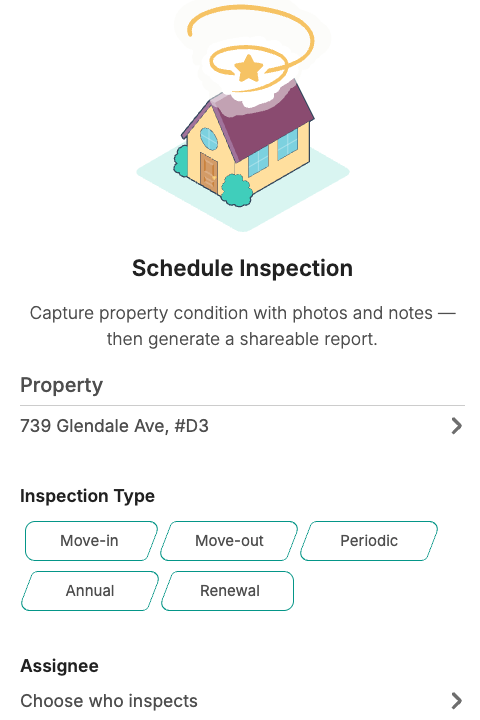
Guided walkthroughs
Room-by-room walkthroughs enforce condition ratings, required notes, and photo evidence before any space can be marked complete.
Condition records
Every inspection produces a health score at the property, space, and element level — a condition record, not just a photo album.

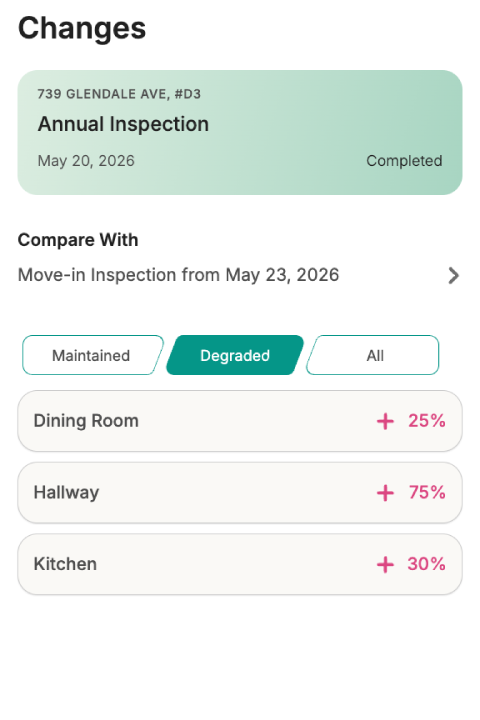
Change tracking
Compare two inspections side by side to see what improved, what degraded, and what stayed the same — down to the space and element level.
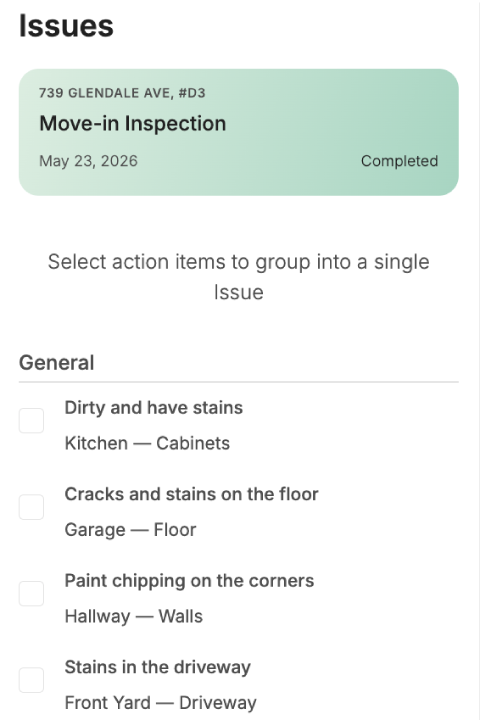
Work order creation
Select any flagged finding and convert it into an AI-generated work order in one step. Photos and inspector notes carry over automatically.
Clear property condition records, every time
Every room, every finding, every responsibility — structured into a verified record that always builds on the history that came before it.
Room-by-room walkthroughs
Every space is inspected in sequence, requiring an explicit condition rating of Good or Needs Attention. Flagged defects cannot be saved without notes and a photo, instantly capturing evidence and assigning responsibility — owner, tenant, or manager — on the spot.
Explore preventive maintenanceMeasurable health scores
Turn subjective visual checks into objective data. Every completed inspection calculates an immediate health percentage at the property, space, and element level based on your findings, letting you easily monitor asset condition over time.
Explore asset intelligenceTrack every change
Compare any two inspections side by side to see exactly what improved, degraded, or stayed unchanged. Spanr maps health deltas across spaces and trend directions per element, with quick filters to isolate degraded items instantly.
See renewals and remindersFindings to work orders
Flagged defects appear in a dedicated Issues tab sorted by trade specialties like Plumbing or HVAC. Select individual items or bundle multiple findings into a single combined work order with all original notes and photos attached.
See maintenance operationsFAQ
What types of inspections does Spanr support? 
Spanr supports move-in, move-out, periodic, annual, and renewal inspections — each with a dedicated workflow. Inspections are tracked separately and integrated with the events and reminders system so the right people are notified and kept in sync throughout the lifecycle.
What makes a Spanr inspection record defensible compared to a paper checklist?
Spanr inspections are built for audit-grade accuracy. First, each inspection is tied to a frozen snapshot of the property's blueprint at the time of creation, so the record never changes even if the property is updated later. Second, every Needs Attention finding requires notes and at least one photo before it can be completed, ensuring no partial or incomplete records. Third, every completed inspection generates a timestamped PDF report with structured findings, responsibility assignments, and supporting evidence.
How does Spanr ensure inspection accuracy and consistency during walkthroughs?
Every inspection follows a guided space-by-space workflow that ensures full coverage of the property. Each element must be explicitly marked as Good or Needs Attention before the inspection can be completed. If an issue is flagged, the system requires notes, photos, and responsibility assignment — Owner, Tenant, or Property Manager. The interface also auto-advances to the next incomplete element to prevent missed steps and maintain consistency across inspections.
How does Spanr measure property and space health?
Spanr automatically calculates health scores based on inspection findings. Property-level and space-level health percentages are derived from the ratio of Good elements to total inspected elements. This gives owners and managers an immediate, at-a-glance view of property condition, while also allowing tracking of trends across inspections and portfolios over time.
Does Spanr use AI during inspections?
Yes. When an issue is flagged, Spanr can generate AI-powered recommended actions based on the condition observed. It suggests repair steps and assigns primary and secondary trade specializations such as plumbing, HVAC, or electrical. These recommendations can be edited or regenerated by the inspector, helping speed up decision-making while keeping human control over final outcomes.
Can I create work orders directly from inspection findings?
Yes. After an inspection is completed, flagged findings appear in the Issues tab, grouped by trade specialization. You can select one or multiple findings and bundle them into a single work order. Spanr automatically generates a title and description, attaches all relevant photos, and prevents duplicate work orders by marking already-addressed items as covered.
How does inspection comparison work over time?
Once an inspection is completed, you can compare it with any previous inspection for the same property. Spanr highlights what has improved, degraded, or remained unchanged, with health score deltas at both the property and space level. You can also view side-by-side photos and filter results to focus only on degraded items or maintenance priorities.
How does inspection scheduling and reminders work?
Every inspection is automatically linked to a calendar event. Due dates, assignments, and status changes are reflected in real time, and participants receive notifications when inspections are created, updated, completed, or cancelled. If a due date changes, the linked event reschedules automatically to keep everyone aligned.
Is the completed inspection report exportable and shareable?
Yes. Every completed inspection generates a structured PDF report that includes findings, condition summaries, responsibility assignments, and supporting evidence. Reports can be accessed from the Report tab and shared instantly via the device's native share options or copied as a link for distribution to tenants, owners, or stakeholders.
What is a blueprint snapshot in Spanr inspections?
A blueprint snapshot captures the exact state of a property's spaces and elements at the moment an inspection is created. This snapshot is frozen and never changes, ensuring that inspections always reflect what existed at the time of the walkthrough. This allows fair comparisons between move-in and move-out inspections and creates a reliable historical audit trail.