Your Trusted Pros, First in Line
Keep your preferred vendors in one place, pin them to the properties they serve, and let Spanr bring them in first whenever work comes up.
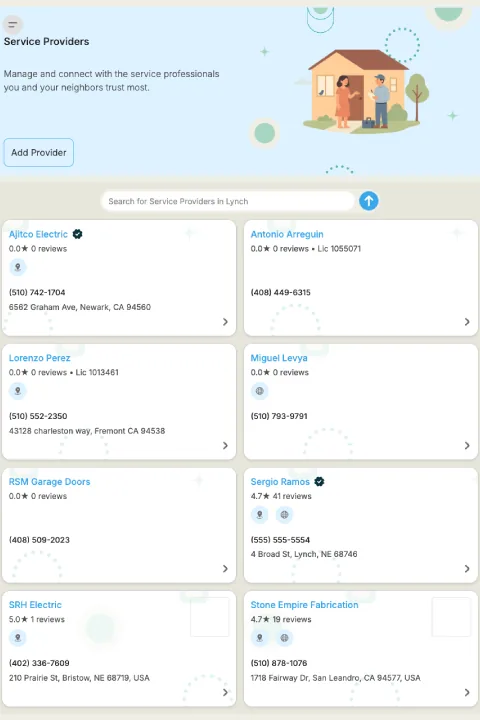

Your vendor network, organized

Add providers fast
Scan a business card, upload a file or enter details by hand. Duplicate contacts are matched by phone number automatically.

Pin per property
Assign your go-to vendors to each property so they're surfaced first when a new issue is created.

Trust signals
License numbers, verified status and job-by-job ratings help you choose with confidence.

Shared with your team
Everyone on a shared property works from the same synchronized provider list, with permission-controlled access.
The vendors you trust, working for you first
Your preferred network feeds directly into Spanr's service coordination, so the right pro gets the job without you making the calls.
Build your network in minutes
Add providers from a business card scan, a file upload or manual entry, across 40+ trade categories. Phone-based identity matching keeps your list clean when the same contact is added more than once.
Preferred vendors come first
Pin vendors at the property level. When a new issue is created, Spanr surfaces your pinned providers ahead of community favorites and other verified local professionals.
See service coordination Choose with confidence
Provider profiles show license numbers, verified status and community ratings. Thumbs up or down after each job builds a track record you can rely on.
One list for the whole team
Shared-property teams see the same provider and contact list, so everyone calls the same trusted pros and nothing gets lost when people change roles.
FAQ
How do I add providers to my network? 
You can add providers three ways — OCR-assisted business card or document scan, file upload, or manual entry. Phone-based identity matching automatically prevents duplicate records when the same contact is added from multiple sources.
Can I prioritize my preferred contractors?
Yes. You can pin preferred providers at the property level so your go-to contractors are always surfaced first when a new issue is created.
What if none of my preferred vendors cover a job?
Spanr also searches community-rated professionals and verified local records, ranked by relevance to the specific job, so you're never stuck without options.
How do I know a provider is trustworthy?
Provider profiles include license numbers, verified status, and community ratings collected from prior jobs. Thumbs up/down feedback is captured per provider and surfaced in search results to help you choose with confidence.
Can my team share the same provider network?
Yes. Shared-property teams see a synchronized provider and contact list, with permission-controlled access ensuring consistency across all collaborators.
Put your trusted pros first in line.
Reduce Vacancy Time
Lower Maintenance Costs
Improve Resident Retention
Give Teams More Capacity